
Automation: Create Invoice via Button
Purpose Streamlines invoicing: when you click the Generate Invoice button on a Clients record, Airtable:
- Finds all unlinked Billed projects and Billable hours for that client (where Invoice is empty).
- Creates a new Invoices record, linking to the client and the full list of those project and hours records.
This gives a single-click workflow to package up every outstanding deliverable and work log into a fresh invoice.
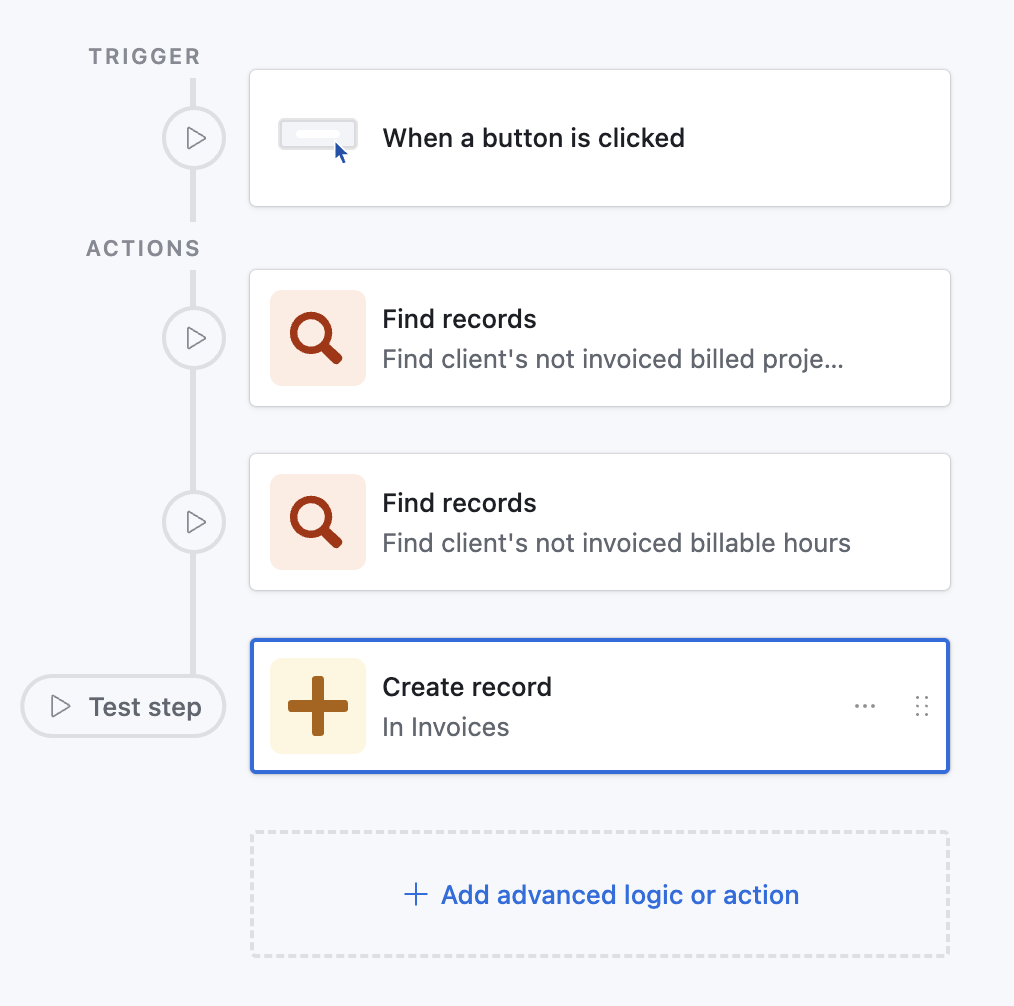
Prompt for Airtable Omni
(Quickly create this automation via AI in your base)
text
Create an automation:

• Trigger
  - Type: “When a button is clicked”
  - Table: Clients
  - Button field: Generate Invoice   // your button field name

• Action 1: Find records
  - Table: Billed projects
  - Conditions:
      1. Field “Client” has any of ➤ Airtable record ID of triggering client
      2. Field “Invoice” is empty
  - Output variable: billedProjects

• Action 2: Find records
  - Table: Billable hours
  - Conditions:
      1. Field “Client” has any of ➤ Airtable record ID of triggering client
      2. Field “Invoice” is empty
  - Output variable: billableHours

• Action 3: Create record
  - Table: Invoices
  - Set field “Client” to ➤ Airtable record ID of triggering client
  - Set field “Billed projects” to ➤ billedProjects  // list from Action 1
  - Set field “Billable hours” to ➤ billableHours     // list from Action 2
Paste the entire block into the AI Assist prompt inside Automations; Airtable will turn it into a multi‑step automation that batches outstanding items into an invoice.